Lab note
Building a Closed-Loop Autonomous Marketing Crew: Inside My CrewAI-Powered 'Chess for Kids' Social Automation

SFMC architect · technical writer · 7 min read
- AI Agents
- CrewAI
- Python
- Automation
A few months back, I was diving into some training on Agentic AI on Udemy, and the CrewAI framework instantly caught my attention. I kept thinking about how powerful a coordinated group of AI agents could be when tasked with a real-world, multi-step challenge—not just running simple, linear prompts, but actually collaborating, reviewing each other's work, and executing tools autonomously.
To test what CrewAI is truly capable of, I decided to build a passion project: a fully autonomous, multi-agent marketing crew designed to run a specialized community page called Chess for Kids.
The goal? Create an end-to-end system that looks at audience engagement, pulls fresh chess data, crafts engaging copy for kids and parents, builds custom graphics, and automatically publishes the posts to Meta.
You can check out the live page on Facebook here: Chess for Kids Facebook Page.
As you can see in the dashboard screenshot below, the page is up, running, and powered by our digital AI crew:
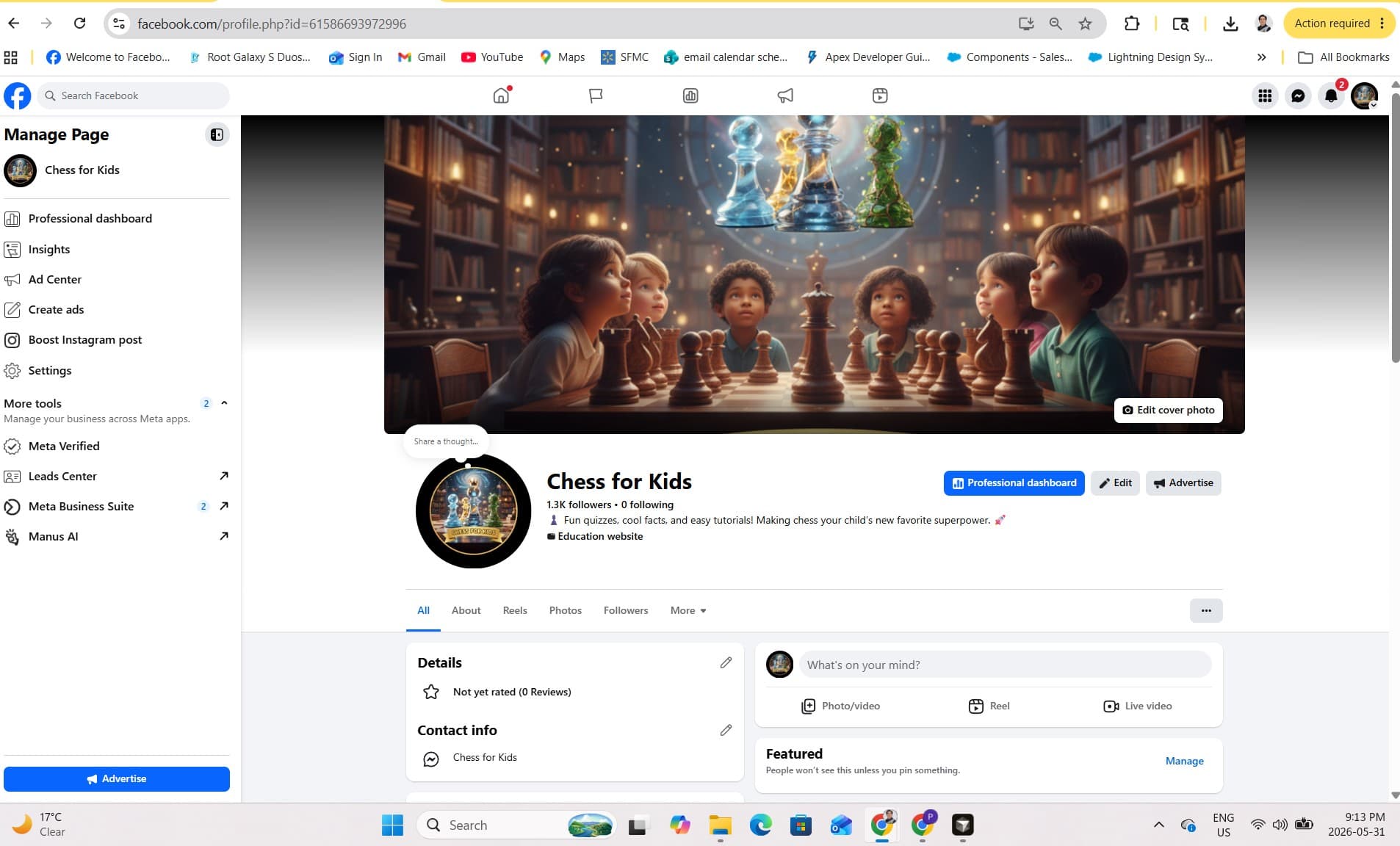
Here is a deep dive into how I designed this hierarchical agent architecture, how I handled the tricky Facebook Meta Graph API integration, and how the whole workflow operates behind the scenes.
1. The Blueprint: Designing a Hierarchical AI Team
Instead of a basic sequential pipeline where Agent A blindly hands off text to Agent B, I wanted this to function like a real, professional marketing department. To achieve that, I leveraged CrewAI's Process.hierarchical orchestration engine.
The system relies on a Manager Agent supervising three highly specialized worker agents:
                +-------------------+
                |   Manager Agent   | <---+ (Supervises, reviews, & delegates)
                +---------+---------+
                          |
         +----------------+----------------+
         |                |                |
+--------v-------+ +------v--------+ +-----v------+
|    Educator    | |  Storyteller  | |    Artist    |
| (Research/Data)| |  (Copywriter) | | (Visuals/3D) |
+----------------+ +---------------+ +--------------+
Here is the breakdown of our active crew roster:
- The Manager Agent (
manager_agent): Operating as the Editorial Director, this agent manages the big picture. Withallow_delegation=Trueenabled, it doesn't process raw data itself. Instead, it evaluates the global state, distributes tasks, and enforces a strict quality assurance gate before anything goes live. - The Educator Agent (
educator): This is our domain grandmaster and data researcher. Its job is to dive into performance metrics, track what we've already posted to avoid repetition, and fetch fresh chess puzzles, news, or trivia. - The Storyteller Agent (
storyteller): Our creative copywriter. It translates dry, technical chess configurations into highly engaging, Pixar-style storytelling tailored specifically to inspire young players and their parents. - The Artist Agent (
artist): The multimedia production engine. Operating like a digital artist, it takes the output from our storyteller or educator and either renders clear chess board diagrams or uses AI imagery to bring fictional chess heroes to life.
2. Setting Up the Facebook Meta Integration (The Technical Hurdles)
The most common question when building social media agents is: How do you actually grant an LLM secure permission to post on Facebook?
To make this completely autonomous, I integrated the custom tools with Meta's Graph API v22.0. If you want to replicate this in your own project, here is the exact integration blueprint you need to follow:
Step A: Configure Your App in Meta for Developers
- Go to the Meta for Developers portal and create a new App (choose Other -> Business app type).
- Under the App settings, add the Facebook Login for Business product.
Step B: Generate a Long-Lived Page Access Token
This is the trickiest part. Standard user access tokens expire after a couple of hours, which completely breaks an automated system. You need a permanent or long-lived Page Access Token:
- Use the Graph API Explorer tool to request a Short-Lived User Access Token with the following permissions:
pages_manage_posts,pages_read_engagement, andpages_show_list. - Exchange that short token for a Long-Lived User Access Token (valid for 60 days) via Meta's access token endpoint.
- Finally, query the
/me/accountsendpoint using that 60-day token. The API will return an immutable, Long-Lived Page Access Token specifically for your Chess for Kids page. This token does not expire unless you change your Facebook account password or revoke permissions.
Step C: Secure Your Agent's Environment Variables
Store these safely in your .env file so your CrewAI script can reference them inside tools.py:
FACEBOOK_PAGE_ID="your_page_id_here"
FACEBOOK_PAGE_ACCESS_TOKEN="your_long_lived_page_access_token_here"
OPENAI_API_KEY="your_gpt_4o_key"
3. The End-to-End Execution Flow
With the tokens secured and the code initialized inside main.py, the crew runs through a synchronized, 5-phase loop every time it executes:
Phase 1: Listening and Optimizing
The loop kicks off with the analysis_task. The Educator uses a custom get_facebook_insights tool to hit the Meta Graph API, pulling down engagement data (likes, comments, reach) from our last 5 posts. It builds a live Trend Report detailing what content styles our audience is loving most.
Phase 2: Content Strategy & Sourcing
The Educator carries that Trend Report into the research_task. It opens a local file called post_history.md to make sure we don't duplicate old content, and matches findings against our weekly content calendar:
- Monday: Motivational Quotes
- Wednesday: The Big Puzzle (fetches live FEN notation and data via the Lichess API)
- Friday: Fun Chess Facts
Architectural Twist: If the Trend Report shows a specific post category is performing exceptionally well, the agent has the structural flexibility to override the static calendar day and ride the wave of viral engagement.
Phase 3: Parallel Creative Production
Once the strategic content brief is completed, the workflow splits into two parallel tracks:
- The Writing Track (
writing_task): The Storyteller crafts the copy, ensuring open-ended questions are included to spark engagement in the comments, while dropping clean emojis and safe, verified links. - The Visual Track (
visual_task): The Artist builds the corresponding graphic. If it's a Wednesday puzzle, it uses a custom Python script powered byfentoboardimageand Pillow to programmatically draw a clean, custom-colored chessboard. If it's an educational quote, it triggers the OpenAI DALL-E 3 tool to generate vibrant, story-driven illustrations.
Phase 4: The Manager's QA Gate
Before anything touches production, the Manager Agent audits the entire package (review_task). It acts as a hard filter to check for any typical LLM hallucinations or formatting quirks (like accidental markdown markers or broken outbound URLs). If it spots an issue, it rejects the draft and automatically sends it back to the respective worker agent for correction.
Phase 5: Guardrailed Publishing
Once approved by the Manager, the Storyteller utilizes our custom post_to_facebook tool. To guarantee absolute safety, I coded two deterministic safeguards directly into the Python tool layer:
- URL Whitelisting: The tool programmatically scans the post payload and instantly drops the execution if any link points outside trusted domains like
lichess.orgorchess.com. - Sanitization: Regex cleaners scrub out accidental system headers (like
Caption:) right before making the HTTP POST request to Meta's servers.
Upon a successful HTTP 200 response from the Graph API, the system automatically appends the newly published post log into post_history.md, cleanly closing the loop.
4. Key Takeaways and Next Steps
Building this project taught me a lot about building real, enterprise-grade AI systems:
- Decouple Strategy from Code: Keeping the editorial rules inside configuration YAML files rather than hardcoding them into Python functions keeps the codebase adaptable and resilient.
- Deterministic Barriers are Essential: No matter how intelligent your LLMs are, final execution tools require strict, traditional code-level boundaries (like regular expressions and domain whitelists) to ensure absolute production security.
- State Tracking Matters: Using a lightweight file like
post_history.mdgives individual runtime executions a form of long-term memory, ensuring our agents have full context of what came before them.
The entire source code, structural logic, and tool configurations are fully documented and open source. You can pull the code down, plug in your own Meta tokens, and see how it works firsthand!
Check out the complete codebase here: 👉 GitHub Repository: chess-for-kids-ai
What are your thoughts on using hierarchical agent frameworks like CrewAI for handling end-to-end operational workflows? Let's talk about it in the comments below!
Editorial Note: This project was built end-to-end by me as part of my ongoing R&D into agentic software development architectures. Because I practice what I teach regarding automation efficiency, the code blueprints and technical write-up from my repository were compiled and polished into this article with the collaborative assistance of generative AI.
Stay updated
Get new posts by email
SFMC how-tos, build stories, and architecture notes—delivered when they publish. RSS works too, but most people prefer email.
One email when a post goes live. Unsubscribe anytime.