Lab note
Building a Free Google Review Audit with Next.js and the Places API

SFMC architect · technical writer · 4 min read
- Local SEO
- Next.js
- Google Business Profile
- Cursor
- Technical SEO
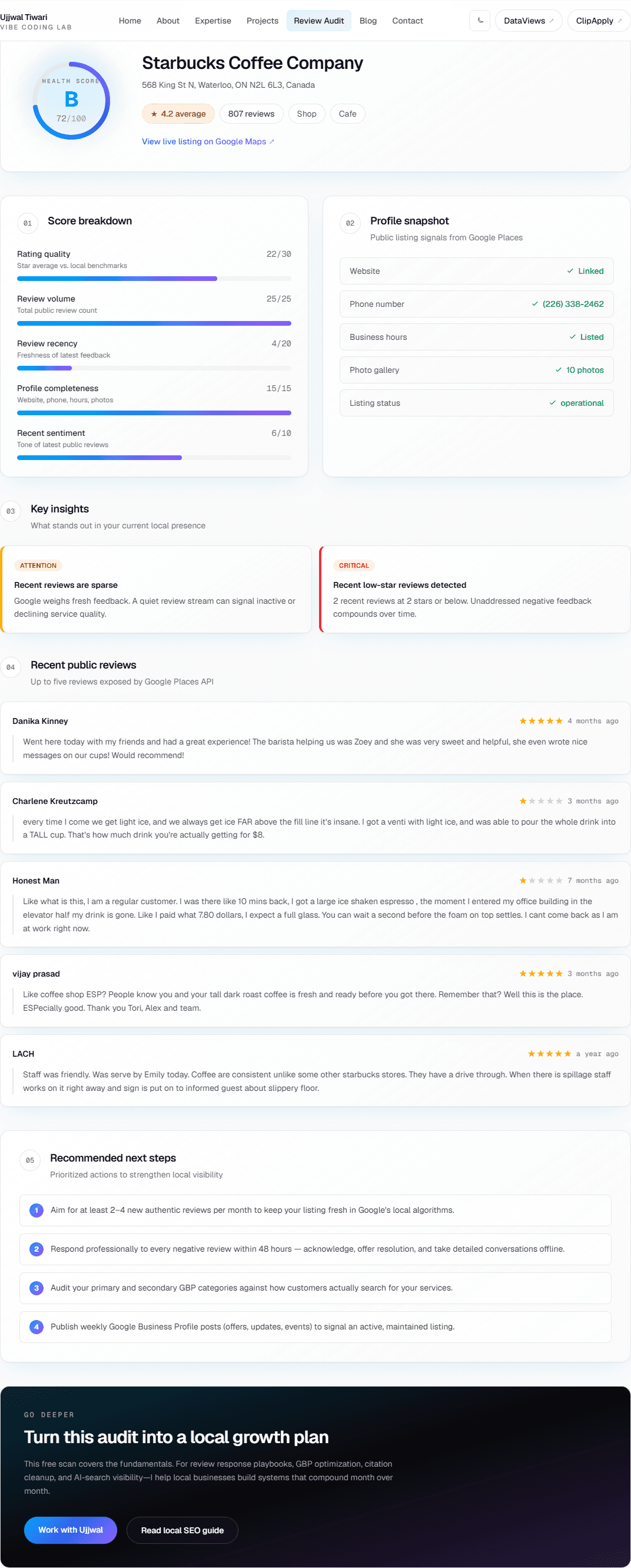
I built a free Google Review Audit on ujjwaltiwari.com. You search for your business on Google, select the right listing, and get a report in a few seconds—health score, profile checks, recent reviews, and suggested next steps.
Reviews and a complete Google Business Profile matter for local search. This tool reads the public signals Google exposes through the Places API and turns them into something you can skim quickly.
How to use it
- Go to ujjwaltiwari.com/tools/review-audit
- Type your business name and city
- Pick your listing from the suggestions
- Read the report
No account required.
What you get in the report
- Health score — 0–100 plus a letter grade (A through F)
- Score breakdown — rating quality, review volume, review recency, profile completeness, recent sentiment
- Profile snapshot — website, phone, hours, photo count, listing status
- Insights — flags like low review count, stale reviews, or a missing website
- Recent reviews — up to five (that is the limit Google returns via the API)
- Next steps — a short list of practical fixes based on your data
The report is generated from Places data on the server. No AI rewrite step—what you see maps back to the fields Google returned.
How the score is calculated
Everything adds up to 100 points:
| Signal | Max points | What it looks at |
|---|---|---|
| Rating quality | 30 | Your star average |
| Review volume | 25 | Total public review count |
| Review recency | 20 | How recent your latest reviews are |
| Profile completeness | 15 | Website, phone, hours, photos |
| Recent sentiment | 10 | Share of recent 4– and 5-star reviews |
The cutoffs are simple rules, not a perfect model of Google’s ranking algorithm. They are meant to highlight clear problems—a profile with three reviews, nothing new in six months, no website linked—not to predict exact map pack position.
How it is built
| Layer | Technology |
|---|---|
| Frontend | Next.js 16, React 19, TypeScript, Tailwind CSS 4 |
| Data | Google Places API (New) — Autocomplete and Place Details |
| API key | Server-side only on Vercel |
| Hosting | Vercel |
Two routes power the tool:
Autocomplete — GET /api/tools/review-audit/autocomplete?q=...
Returns business name and address suggestions as you type.
Analyze — POST /api/tools/review-audit/analyze
Takes a Google placeId, fetches rating, review count, reviews, website, phone, hours, photos, and categories, then runs the scoring logic.
The API key never ships to the browser. In Google Cloud Console it is restricted to Places API (New) only.
Things to know
Places API (New), not legacy. Enable the correct API in Google Cloud and attach billing. There is a free monthly allowance; set a budget alert if you build your own version.
Five reviews max. Place Details only exposes a handful of recent public reviews. The tool cannot show your full review history through this API alone.
Field masks. The New API requires you to request specific fields. That keeps responses small and costs predictable.
Server-side keys. Referrer-restricted keys break Next.js API routes. Keep the key on the server.
Rate limiting. Autocomplete and analyze routes are rate-limited per IP via Upstash Redis (40 autocomplete requests per minute, 15 analyze requests per hour) to protect the Places API budget.
The tool does not run citation audits, competitor comparisons, or review-response tracking. It is a snapshot of one listing from public Places data.
Related free tool
After you audit your Google listing, add LocalBusiness JSON-LD to your website with the free Schema Generator. Both tools are listed on the tools hub.
Try it
Run the free Google Review Audit →
If you have any questions, contact me.
Stay updated
Get new posts by email
SFMC how-tos, build stories, and architecture notes—delivered when they publish. RSS works too, but most people prefer email.
One email when a post goes live. Unsubscribe anytime.